If you’ve been using Facebook for
a few years, then you know your account contains a veritable treasure
trove of information that thieves would just love to mine. It may go
without saying, but firmly securing your Facebook account is going to go
a long way towards protecting you from exposing a big chunk of your
personal life to unsavory elements.
Thankfully, Facebook has a lot of tools for securing your account. Here’s what you should do.
Choose a Strong Password
Let’s start with one of the most important things: choosing a strong password. Your
password is the first and often best security mechanism for keeping
invaders at bay, so take care here. Make sure it is long (12 to 14
characters or longer), a mix of characters, and contains no personal
information, since those can be easily can be socially engineered.
RELATED: Why You Should Use a Password Manager, and How to Get Started
Most importantly, though, don’t use this password anywhere else on
the internet. You should use a different password for every single
account you have, and ideally, they’d all be random strings of
characters. That’s why using a password generator and manager like LastPass is, by far, the best way to secure all your accounts.
Lastly, beware of attempts by others to obtain your password through
nefarious methods. Don’t follow untrusted links, such as those sent in
e-mails, that ask you to enter your password.
Got all that? Good. Let’s change your password to something more
secure. All the settings we’ll refer to in this article can be accessed
using a web browser by clicking the little arrow in the upper right
corner and choosing “Settings” from the drop-down menu, so do that now.
Use Login Approvals
Believe it or not, a strong password is not enough to really secure
your account. These days, it’s just as important to turn on a security
feature known as two-factor authentication—which Facebook calls “Login
Approvals”.
RELATED: What Is Two-Factor Authentication, and Why Do I Need It?
The principle behind it is simple: You sign in with something you know (your password), and something you have—which
is usually your phone. After entering your password, Facebook will send
a code to your phone that you type in on the site, to confirm that you
are who you say you are. That way, if someone found out your password,
they still wouldn’t be able to log in without also having your
phone. You can get this code as a text message, or through an
authentication app on your phone like Google Authenticator or Authy. You can read more about two-factor authentication, and why it’s so important, here.
This feature—again, called “Login Approvals” on Facebook—can be
enabled from Settings > Security > Login Approvals. Check the box
next to “Require a login code to access my account from unknown
browsers”.

Next time you log in, you’ll be prompted for your approval code, which should be sent to your phone.

After entering your code, you will be asked if you want to store that
browser so you don’t have to enter an approval code next time you log
into Facebook using that browser.

This feature can be disabled at any time in the Login Approvals
settings. We recommend, however, that you leave them on and get used to
using them. It’s an essential security feature of just about every
service these days.
Note: if you’re trying to log into another app with your Facebook
account, but it doesn’t support Login Approval codes, you can use a
one-time app password from the “App Passwords” option in Facebook’s
security settings.
Enable Login Alerts and See Who’s Logged Into Your Account
Strong passwords and Login Approvals are the two best ways to truly
secure your Facebook account, but there are other methods you can employ
to give you peace of mind. Login Alerts are one such tool. You’ll find
them under Settings > Security > Login Alerts.
You can either choose to get a notification on Facebook, over email,
or as a text message. The next time anyone logs in from an unrecognized
device or browser, you’ll be notified.

This is also a good time to see what machines are logged into your Facebook account.
If there are any you don’t recognize, you can log them out remotely.
(Chances are, you’ll only see your own machines here, but you can never
be too careful).
Head to Settings > Security > Where You’re Logged In, and click
“End Activity” for any unfamiliar devices or locations. If you don’t
want to go through and review every session on the list, click “End All
Activity” to log out from all devices on the list.

You don’t need to save any changes with this step, once you end activity for a session, it’s done.
Note: if you log out from a session, you’ll still be able to log in
on that machine without entering a Login Approval code. You can revoke
access for any Login Approvals—say, if your laptop or phone gets
stolen—from “Recognized Devices” in the Security settings. Just Remove
any browser or device that you’ve previously approved, then click “Save
Changes”. The next time that device tries to log in, they’ll need a
Login Approval code again.

Audit the Apps that Have Permission to Access Your Facebook Account
Other apps can have access to your Facebook account, too. This is
what allows you to use Facebook chat in your desktop chat app, or see
Facebook posts in Flipboard. But these apps are like dust bunnies—they
just seem to multiply in great numbers over time. Head to Settings >
Apps and take some time to remove anything that looks suspicious or you
no longer use.

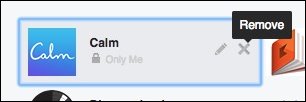
To remove an app, just hover over it and click the “X” on the right-hand side.
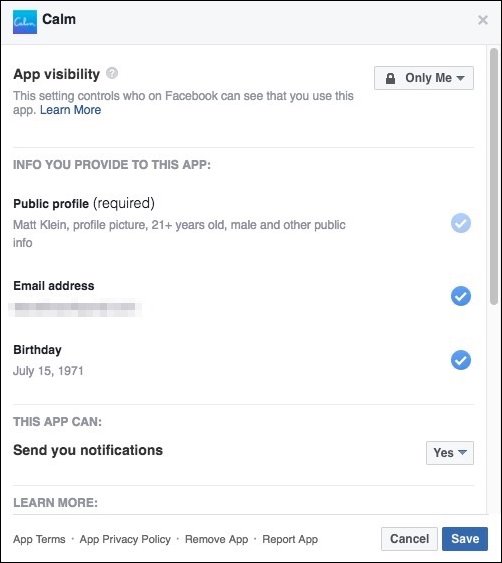
Alternatively, you can click the “Edit” button (right next to the
Remove button) to change what information you provide to an app.
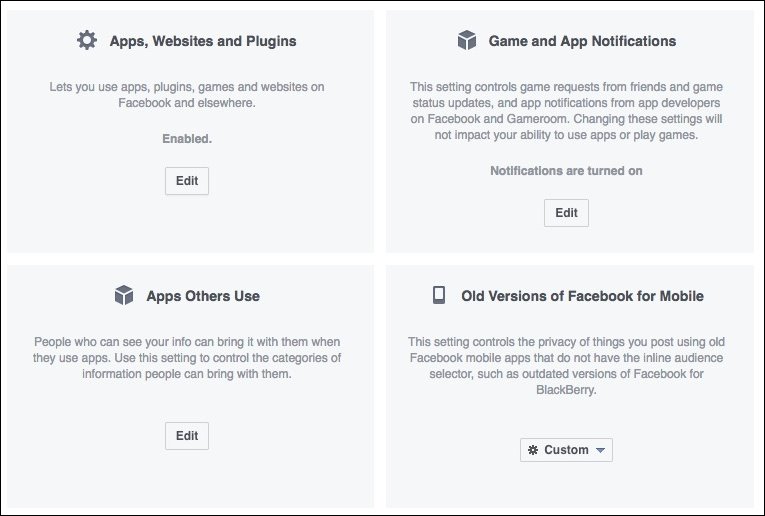
At the bottom of the Apps Settings screen, you can change settings for a number of different items.

Here’s what each of these settings means.
Apps, Websites and Plugins
Turning this off will disable Facebook integration with third-party
apps, websites, and plugins entirely. That means you won’t be able to do
stuff like log in with your Facebook account from websites or
applications, games, and other things.

Click the “Edit” button to learn more and to disable this feature.
Game App Notifications
Hate getting notifications from friends who play games and want you to play games too? Turn those off here.
Apps Others Use
When you connect an app to your account, it can sometimes see
information about your friends. Thus, when your friends use apps, they
can sometimes see information about you. Click Edit on this section to
change what your friends’ apps can see about you.

These categories all appear to be an opt-in type of deal—so you can
safely leave them unchecked—but it never hurts to know what’s what.
Old Versions of Facebook for Mobile
This setting controls the privacy of anything you post using old,
outdated versions of the Facebook mobile app. Basically, if you’re not
using a BlackBerry or some other dinosaur of a device, you don’t have to
worry about this.
Peruse the Rest of the Security Settings
The settings we’ve highlighted so far are the most important settings
everyone should use. The rest of the security settings are up to you,
but it’s worth going through and checking out which might be useful for
you.
Trusted Contacts
Hopefully you’ll never get locked out of your Facebook account. If
you’re using a password manager (like we recommended above—you set one
up, right? Do it now!), you’ll never forget your password. And even if
you do, you can always reset your password…as long as you have access to
your email account.
RELATED: How to Use Facebook Trusted Contacts to Gain Access to Your Locked Account
If, for some reason, you lose access to all those things, Facebook’s “Trusted Contacts” feature
can help, as long as you set it up ahead of time. Trusted Contacts
allows you to pick three to five friends you can call if you can’t
access your account. They then will give you the codes necessary to get
back in.
Just head to “Your Trusted Contacts” on the security settings page to set this up.

Be sure to give your trusted contacts a heads up that you’re using
them, and if anything ever goes down, they should make sure that it’s
you calling before handing over the keys to your account.
Public Key
Most users won’t use this, but if you’re interested in encrypting
notification e-mails “end-to-end” from Facebook, you can add your OpenPGP public key with this option.

This may be a little advanced, and perhaps you don’t even receive
notification e-mails, but if you do, and you want to encrypt them, then you can learn more about it.
Profile Picture Login
This is a newer feature that Facebook introduced, which lets you just
click your profile picture in lieu of typing your password.

Thus, anyone with access to your browser can click on your picture
and log into your account. This is probably a bad idea, so we don’t
really recommend turning this on.
Legacy Contact
RELATED: How to Set Your Facebook Account to Delete or Memorialize You Upon Your Death
Ever wonder what happens to your Facebook when you die? That’s what Legacy Contacts are for. You
set someone (like a spouse or family member) as your legacy contact,
and if you die, they can do stuff like pin posts to your Timeline,
respond to friend requests, and update your profile picture. They cannot
post anything to your Timeline or view your messages.

The legacy contact option is important because once you’re gone,
hackers can potentially access your account and you won’t be around to
prevent or respond to intrusions.
Alternatively, you can choose to have your account deleted upon your demise.
Deactivate Your Account
This deactivate option is typically used to give you a break from
Facebook, but is also useful if your account is hacked. It’s simple
enough, just click “Deactivate”, enter your password, and read through
the instructions to go through with it.
Lastly, don’t neglect basic, general security practices either. If
you log into your account from a public computer or on someone else’s
device, make sure you always log out and, if you can, clear the history
when you’re done (or, better yet, use the browser’s private mode).
Never leave yourself logged into your account, even if you walk away
for just a few seconds. Make sure your computer and browser are always
up to date, and have good virus and malware protection installed at all times.
Of course, this is all about keeping intruders out of your account.
But if you’re also worried about your privacy on Facebook, that’s
another topic entirely. Check out some of the stuff we’ve done in the
past—you can rein in posts you’re tagged in, block people from posting on your timeline, and even make all your old Facebook posts more private. Want to clean up some embarrassing things from your Facebook past? Here’s a little trick for doing so. Be sure to peruse all of the “Privacy” options in Facebook’s settings to see everything you can do.
The above article may contain affiliate links, which help support How-To Geek.




JOIN GEEK TALK ON FACEBOOK